- LSL Verdant
- 11 looks in up to 5 light variants each (Full Sun, Overcast, Shade, Golden Hour, Backlight), 53 presets.
- 7 tools and 11 creative profiles, one per look, with an Amount slider.
Verdant
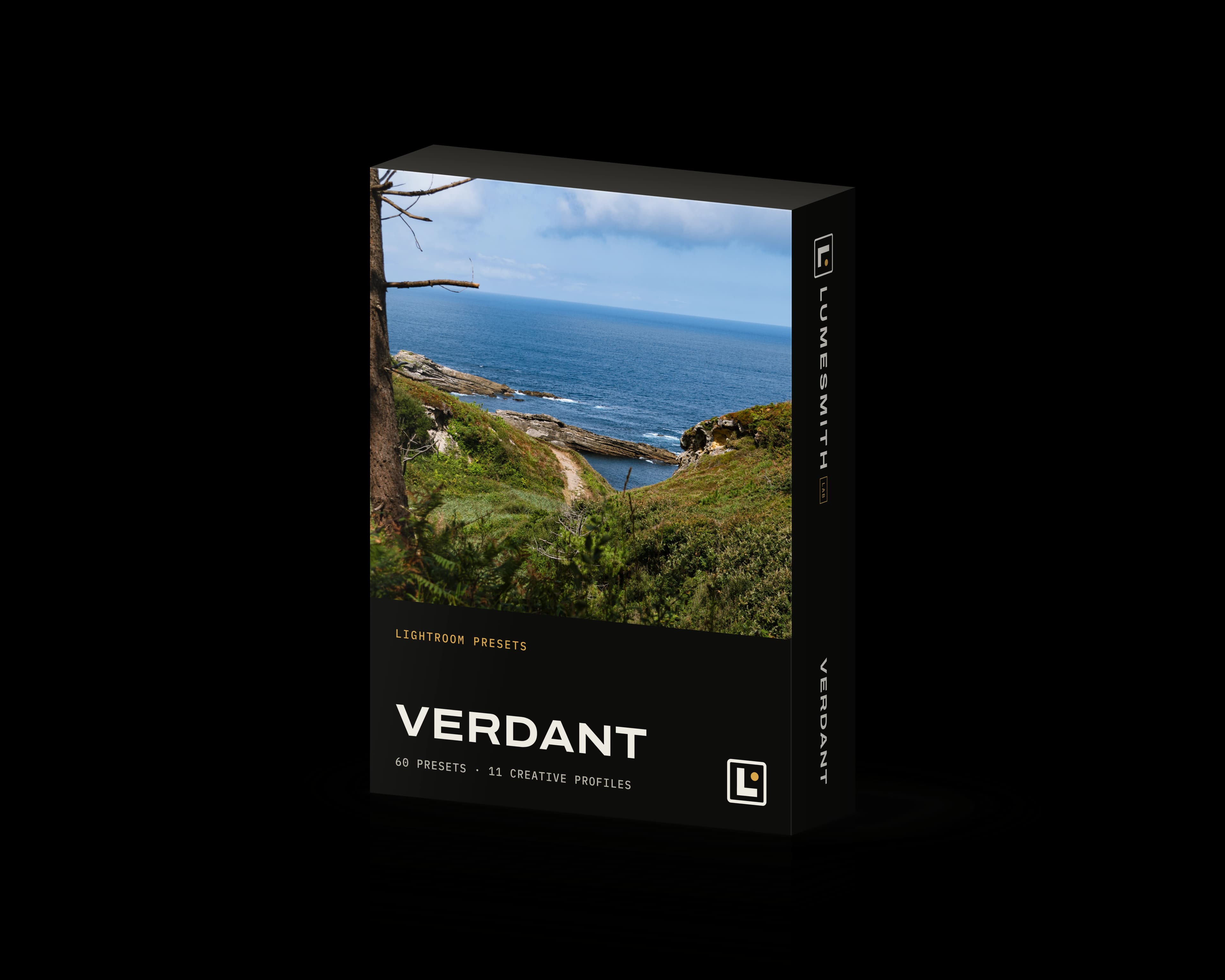
Vivid greens that make your photos shine. From deep forest shade to a golden meadow, each look gives the greens a color of its own, and calm skies keep the plants as the subject. Versions are ready for gray days, forest shade and sun through the leaves.
€19.99VAT included
Download right after payment · Free updates · For Lightroom Classic, Lightroom and Camera Raw · Part of the Nature bundle
- Presets
- 60
- Looks
- 11, up to 5 lights each
- Tools
- 7
- Creative profiles
- 11
Verdant€19.99
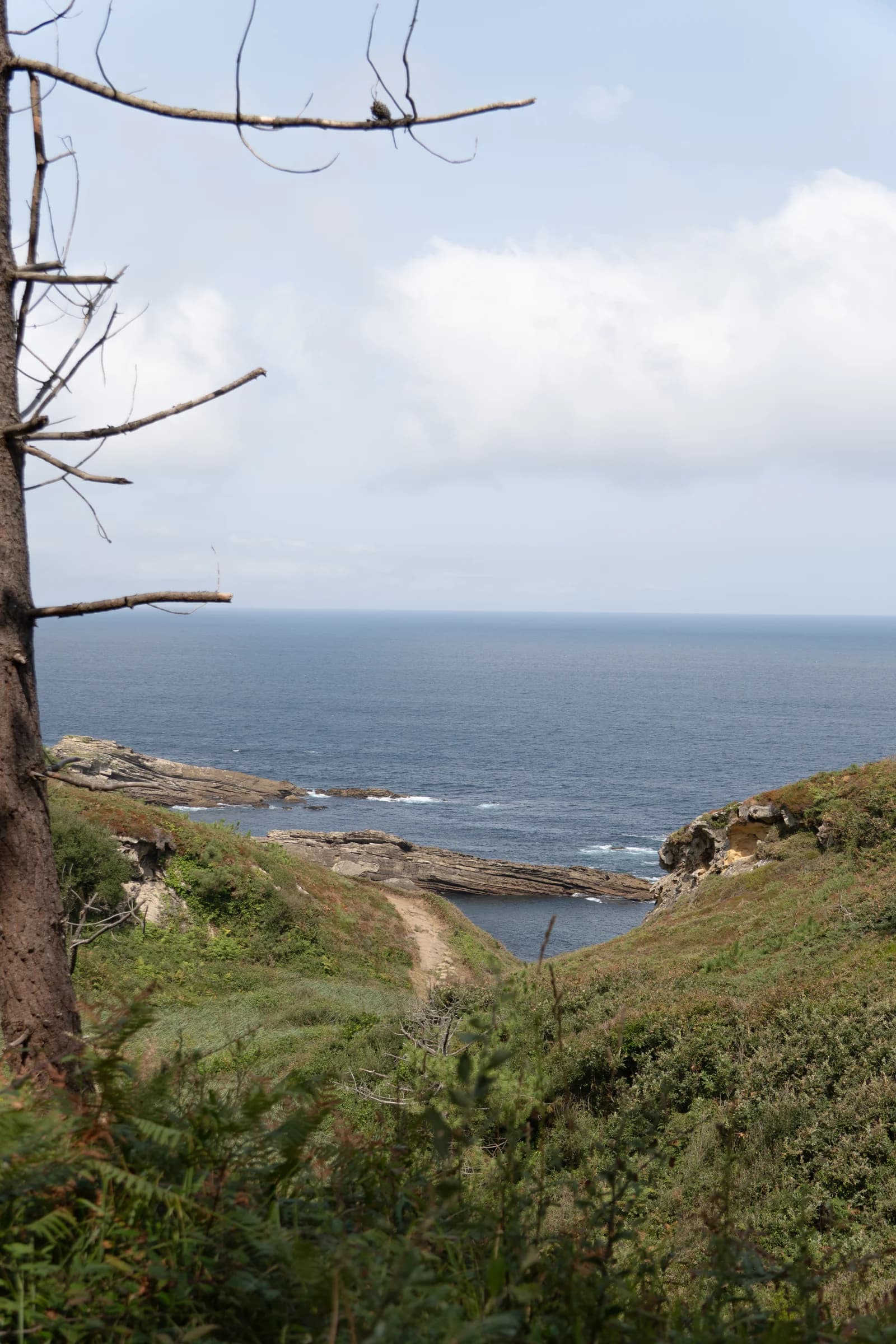
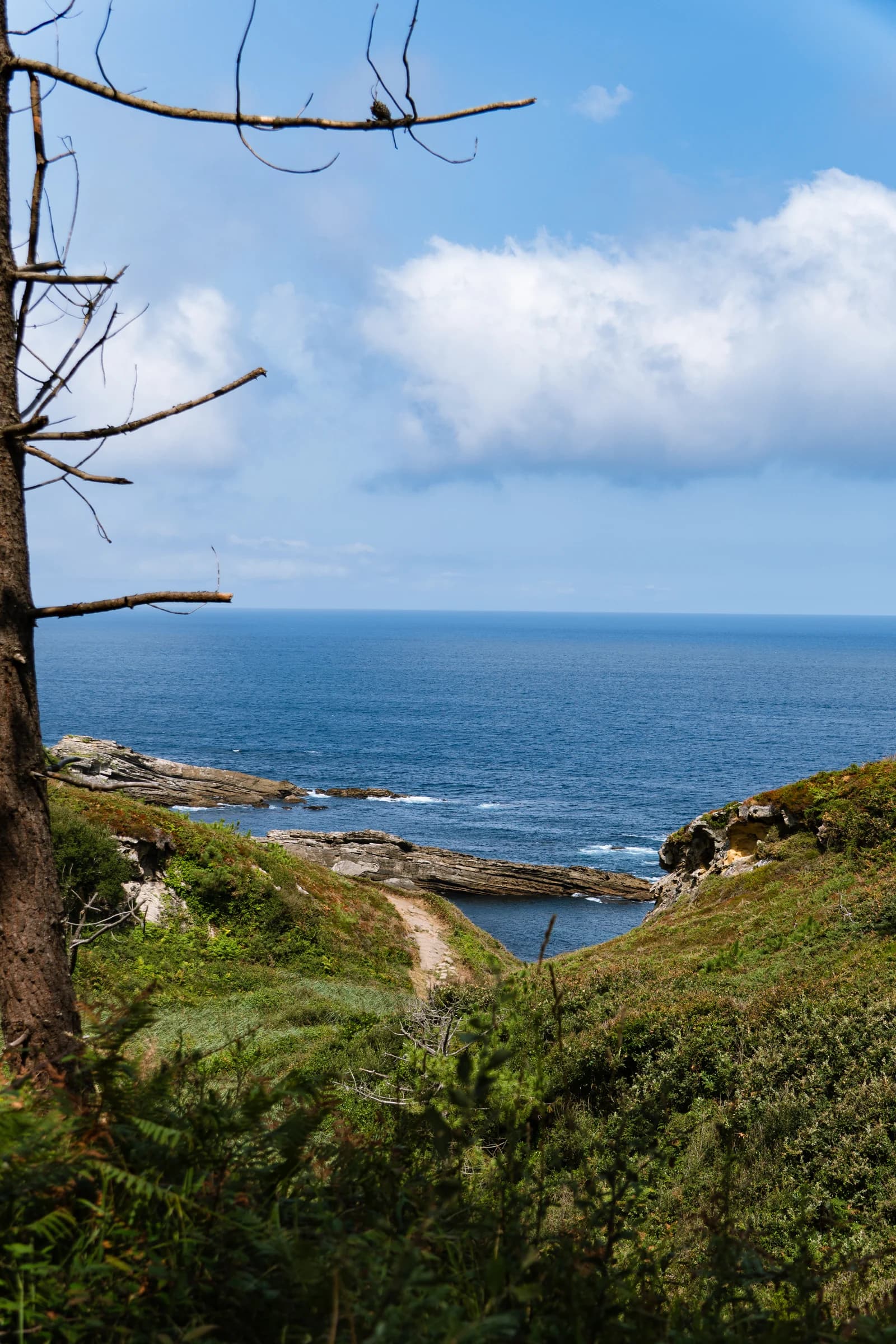
Before and after with Verdant
Evergreen
- After
- The before photo with only the preset applied, at 100%.
- Before
- The RAW file with the Adobe Color profile, lens corrections, and exposure and white balance set by hand.
Why the look holds when the light changes
A version for the light in your photo
Light changes a look: shade adds a blue cast, golden hour makes the oranges stronger. So each look comes in several light versions, and you pick the one that matches your photo.
Your exposure and white balance stay yours
Set them as you always do: no look changes them, and Reset Look takes the look off without touching them.
11 looks, 60 presets
Choose your look, then your light
Pick a look for its colors and its mood, then the version made for the light you see in your photo.
- MossDark, dense tones, rich olive greens and soft, cool shadows: the forest floor, deep in the woods.
- Full Sun
- Overcast
- Shade
- Golden Hour
- Backlight
- Spring LeafSoft yellow-green leaves that never turn lime, a pastel sky and a faint warm glow: spring, light and airy.
- Full Sun
- Overcast
- Shade
- Golden Hour
- Backlight
- Morning MistSoft early light, cool sage greens and the mist left in place: woods and valleys in the morning.
- Full Sun
- Overcast
- Shade
- Golden Hour
- Backlight
- EvergreenDeep, cool blue-green conifers, clean whites and cool shadows, crisp and clear: the mountain forest.
- Full Sun
- Overcast
- Shade
- Golden Hour
- Backlight
- Golden MeadowGolden grass, warm, lively greens and glowing light: summer fields in warm light.
- Full Sun
- Overcast
- Shade
- Golden Hour
- Backlight
- Turning LeavesGreens turning golden olive, amber yellows and rust oranges against cool shadows: the start of autumn.
- Full Sun
- Overcast
- Shade
- Golden Hour
- Backlight
- RainforestDeep emerald greens, shadows with a teal tint and glossy leaves catching warm light: the humid tropical forest.
- Full Sun
- Overcast
- Shade
- Golden Hour
- Backlight
- SunbeamGlowing golden light, slightly cool shadows, soft whites and a light grain: sun streaming through the leaves.
- Full Sun
- Shade
- Golden Hour
- Backlight
- Storm GlowA heavy sky over vivid, sunlit yellow-greens, with deep, cool shadows: sun breaking under dark clouds.
- Full Sun
- Overcast
- Golden Hour
- Backlight
- BotanicalTrue, rich colors of leaves and flowers: dense greens, vivid petals with all their detail, clean whites.
- Full Sun
- Overcast
- Shade
- Golden Hour
- Backlight
- Olive GroveSilvery olive greens, dry golden grass, terracotta and warm stone under a deep, calm sky: clear Mediterranean light.
- Full Sun
- Overcast
- Shade
- Golden Hour
- Backlight
Some lights go against a look, so we left those versions out. No Overcast preset for Sunbeam. No sunbeams under a gray sky: the look would only look washed out. No Shade preset for Storm Glow. The look is sunlight breaking under dark clouds: in shade there is no sunlit vegetation to set against the sky.
Tools
7 tools for the usual edits, one click each
Add them on top of any look. The tools for the subject or the sky find it in your photo for you.
11 creative profiles to set each look's strength
Each look also comes as a creative profile with an Amount slider: you choose how strong the look is, and all your other sliders stay free. A profile at 100 is stronger than the preset, so start around 50.
- Reset LookTakes the look off. Your exposure and white balance stay as you set them.
- Light GrainAdds a fine, light grain that makes noise less visible.
- Deep SkyA deeper, darker sky with more cloud detail, and blues that stay calm.
- Foliage GlowNeeds Lightroom on a computerA little more light and leaf texture on the vegetation, so the greens stand out.
- Olive GreensNeeds Lightroom on a computerTurns loud greens toward a calmer olive, on the vegetation only.
- Textured GroundNeeds Lightroom on a computerGives soil, rocks, sand and grass more texture and weight, to anchor the foreground.
- Calm WaterNeeds Lightroom on a computerLess glare and calmer color on water, so reflections stay quiet.
Is this pack for you?
When Verdant is not the right pack
- Wildlife and portraitsFor animals, see Wild. For portraits, see Wander.
- City and nightThe pack has no blue hour or night versions. For the city, by day or at night, see Downtown and Downtown Night.
- Black and white, infrared, teal and orangeThis pack has none of these looks.
- Lightroom mobileThe presets work on Lightroom mobile, except the tools marked "Needs Lightroom on a computer" in the tools list.
Questions
I've bought presets before that looked wrong on my photos. Why would these be different?
Often the light is the cause: a preset made in one light goes wrong in another. Here you set your own exposure and white balance first. Then, for a color look, you pick the version made for the light in your photo. This page also says what the pack is not made for.
Can't I just make my own presets?
You can, and some experienced editors make one preset per light for their own look. A pack gives you that work already done for one subject: in Verdant, 11 looks, each in its light versions, and 7 tools.
Will I still have to edit every photo?
You still set exposure, white balance and contrast as usual; the look gives the color and the mood. The pack's tools then handle the local edits this subject often needs, one click each.
What if a look is too strong for my photo?
Each look also comes as a creative profile with an Amount slider: you set the strength, and all your other sliders stay free. Profiles are stronger than the presets at 100, so start around 50.
Will a preset change my exposure or white balance?
No look changes them: set exposure and white balance as usual, then apply the look. The Contrast, Highlights, Shadows, Whites and Blacks sliders also stay where you set them, though each look gives the image its own contrast. A few tools change light or color in one area only, such as the subject or the sky. Reset Look takes the look off.
Does it work with my Lightroom and on my phone?
The pack works in Lightroom Classic, Lightroom and Camera Raw; the compatibility table on this page gives the minimum versions. On Lightroom mobile the looks work: sync them from Lightroom on a computer, or import the unzipped files. Some tools need Lightroom on a computer.
Is it hard to install?
In Lightroom Classic and Camera Raw, you import the zip directly, and the presets appear in the "LSL Verdant" group; in Lightroom Classic, the profiles take a second import. The guide in the zip (in English) shows each step, and if you get stuck, we reply within 2 business days.
Does it work with my RAW, JPEG or phone photos?
The presets are made for RAW files: any RAW file that Lightroom opens, including phone DNG files. They also work on JPEG files, but the result is different and usually weaker.
What if the pack does not suit my photos?
The section "Is this pack for you?" on this page says which photos it is not made for, so you can check before you buy. As long as you have not downloaded anything, you can withdraw within 14 days; from the first download, the sale is final. If the pack does not work with the Lightroom versions listed for it, the legal guarantee of conformity applies: we fix it or refund you.
Which light should I choose for a sunrise?
Golden Hour, if the sun is low and warm. Go by the light you see in the photo: a low, warm sun calls for Golden Hour, at 7 am or at 7 pm.
How do I get an update?
We email you, and the pack shows "Update available" in your account. Download the new version and import it the same way as the first one. The release notes list what changed.
Compatibility
Compatibility
| App | Whole pack | Looks only |
|---|---|---|
| Lightroom Classic | 14.3 or later | 12.4 or later |
| Lightroom (macOS, Windows) | 8.3 or later | 6.4 or later |
| Camera Raw | 17.3 or later | 15.4 or later |
| Lightroom mobile | No: mobile has no landscape masks | Yes, synced from Lightroom desktop |
We make the presets in Lightroom Classic 15.6. The older minimum versions come from Adobe's release notes.
You get 60 presets, 11 creative profiles, the license, an installation guide and the release notes. Lightroom Classic and Camera Raw import the zip directly, and the presets appear in the "LSL Verdant" group; in Lightroom Classic, the profiles take a second import, shown in the guide. Preset names, the guide and the release notes are in English; the license is in English and French.
Release notes
Version 1.0.0 ·
Terms of purchase, in short
- Price
- The price shown includes VAT: it is the price you pay. During a promotion, the crossed-out price is the lowest price of the 30 days before it started.
- Delivery
- You download the files right after payment, then again at any time from your account.
- Updates
- Every new version of the pack is free. We email you when one comes out.
- Right of withdrawal
- You can withdraw within 14 days as long as you have not downloaded anything; from the first download, the sale is final. The legal guarantee of conformity still applies: if the pack does not work with the Lightroom versions listed for it, we fix it or refund you.
- Support
- Write to us about a look, an installation or an order: we reply within 2 business days.
License
- Personal and commercial use
- All your devices
- One license per person
Preset pack
Verdant
For forests, meadows and mountains: vivid greens that make your photos shine, from cool conifer green to warm olive.
Verdant · 60 presets
€19.99VAT included
No fees are added at checkout. Your files are ready right after payment. For Lightroom Classic, Lightroom and Camera Raw.
Or the Nature bundle: Wild and Verdant together for €33.99, €5.99 less than buying them one by one.